Secure operation: run, diagnose, recover and retire capacity
Operational decisions require the current identity, tenant, permitted action and actual state. This guide connects observable execution to controlled recovery and worker retirement. It does not authorize access to another tenant or provider account, nor does an operational success message establish output correctness.
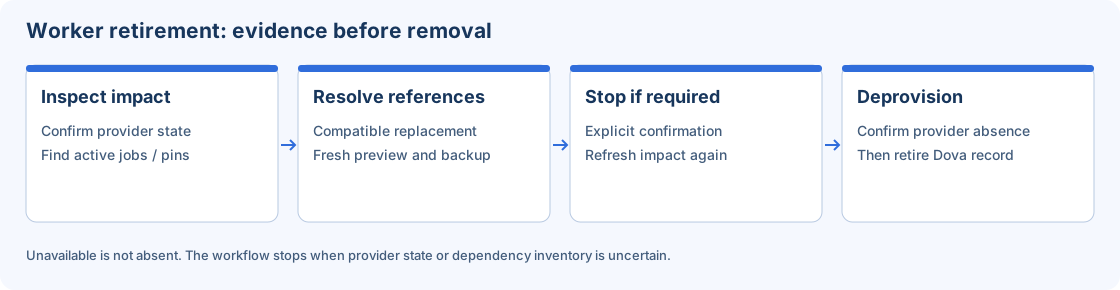
Conceptual retirement path. Provider availability, active jobs and dependency checks can block progression.
1. Establish the authorized context
Open the account menu and confirm user, tenant and active role. Review the target object identifier and location. Separate permission to view from permission to edit, publish, run or administer cloud resources. Keep MFA, normal expiry and logout behavior intact while troubleshooting.
Use a laboratory tenant for demonstrations. Store no credentials in names, parameter text, screenshots or exported incident reports. A safe error message and timestamp are usually enough to begin investigation without attaching raw data.
2. Prepare an observable run
- Record the published Workflow, Session and Mapping versions.
- Check worker eligibility, file bindings and non-sensitive parameters.
- Use a controlled destination and understand whether retries can duplicate writes.
- Launch once and keep the attempt identifier.
- Open Monitor and review task states and the first relevant safe error.
- Inspect and compare the actual result independently after terminal success.
Queued, waiting, running and retry-wait are active states. A timeout in a browser or CLI does not prove that server work stopped. Look up the existing identifier before repeating a launch.
3. Diagnose before choosing recovery
For file errors, inspect Session paths and worker access. For authentication errors, inspect the Connection method, custody and identity permissions. For ineligible capacity, inspect worker state, capability, slots and policy. For an upstream version notice, review pinned dependencies.
Choose cancellation, termination, repeat or checkpoint recovery according to the current state and supported contract. Checkpoint recovery only applies when usable checkpoint state exists. It does not guarantee undoing side effects at an external destination. Preserve the failed attempt while validating a corrected one.
4. Reassign references before worker removal
- Inspect the source worker's current provider state and impact.
- Review default-worker references, active or queued jobs, Sessions, Workflows and credential dependencies.
- Select an authorized compatible replacement or distribution.
- Generate Preview and inspect every intended change and blocker.
- Regenerate Preview after changing a destination or selection.
- Apply an accepted current plan and inspect the dependency backup/result.
- Refresh the source impact before proceeding toward retirement.
The interface manages plan tokens and request identity. Do not alter those values to bypass a conflict. Dependency backups preserve supported reference projections; they are not complete VM images or database/file backups.
5. Retire with current provider evidence
If the VM is running, Stop and deprovision asks for explicit confirmation, sends stop, refreshes impact and proceeds only when allowed. Stop and delete use separate operation identities. A stop failure must not lead to delete; a newly discovered dependency must be resolved first.
The Dova record is retired only after provider absence and final reference checks. Unavailable is not absent. Clean up Dova record is appropriate for confirmed absence, not for hiding a provider-access failure. Closing a dialog cannot undo a provider effect already accepted.
Acceptance and incident evidence
Keep identifiers, versions, timestamps, safe messages, output comparison and current provider observations. Confirm the supported result after each stage and retain audit history. Do not claim cloud cost savings until the resource is confirmed retired at the provider. Follow worker migration and backups for the detailed administrative procedure.