Workers: inspect eligible execution capacity
Workers represent the capacity that executes a Session or Workflow under tenant policy. Online status, provider power state and execution eligibility are related but different observations. A worker can be online yet ineligible because of capabilities, slots, exclusions, sharing rules or lifecycle policy.
Prepare an authorized laboratory host or cloud capacity and know who owns it. Registration uses protected enrollment; tokens are not documentation content. Selecting a worker does not grant access to a database or automatically copy source files onto that host.
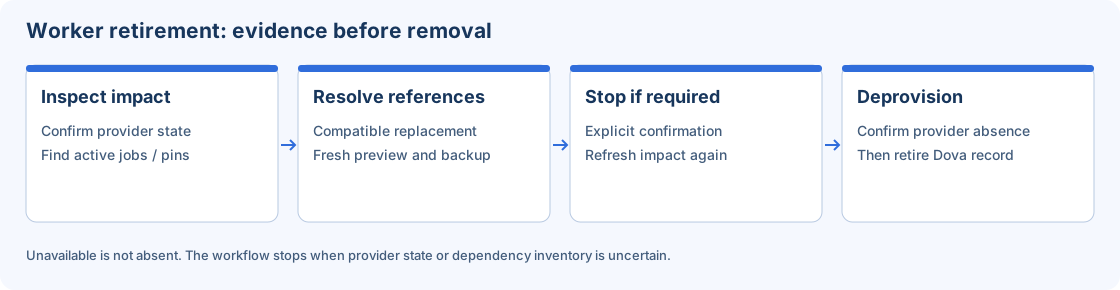
Conceptual worker retirement path; inspection and references remain required before removal.
Step-by-step procedure
Inspect the inventory. Open Workers and locate the intended record. Review its identifier, tenant, state, version and recent heartbeat. Use grid search and columns rather than assuming a familiar name identifies the correct machine.
Review capabilities and capacity. Open detail and inspect reported resources, supported connectors and slot capacity. Compare these with the Session requirements and execution profile. A compatible option can still be temporarily full.
Register only authorized capacity. If using an existing host, start Register worker and select the supported operating system. Follow the generated enrollment instructions and use the hidden token prompt. Confirm the worker registers and reports a recent heartbeat.
Inspect health before assigning work. Review service health and safe diagnostics. If the host was stopped, distinguish restarting the provider VM from restarting the worker service. Cloud provisioning and provider controls belong to Administrator.
Assign a small laboratory Session. Use tenant default or an authorized explicit override in the Session/Configuration. Confirm file paths are available on that worker and the Connection method is resolvable from its identity.
Run and inspect. Execute a small synthetic CSV process and observe the attempt in Monitor. Compare its result with the expected data. Record worker identity and package version, not enrollment secrets or private host details.
Maintain references deliberately. Before removing or replacing a worker, review default policy, active jobs, Sessions, Workflows and dependencies. Use the supported migration/retirement workflow rather than deleting a local record to hide a provider problem.
Verify the result
Acceptance means the record is current, eligible for the selected task and capable of completing a verified laboratory run. Slot counts are weighted execution units: four slots can accept four weight-one jobs or two weight-two jobs, subject to other resource limits. Do not infer unlimited capacity from Online.
Errors and recovery
For no heartbeat, inspect the host service and permitted egress. For ineligibility, inspect tenant/pool rules, lifecycle, capabilities and policy. Provider unavailable is not proof of an absent VM. A failed removal preserves evidence and should be retried through the supported workflow after the actual blocker is resolved.
Continue
Repository · Mappings · Sessions · Workflows · Monitor · Configuration.