Permissions and actions: distinguish visibility, design and operation
Authorization combines the authenticated user, active tenant, active role, effective permissions and resource restrictions. Showing a module is a navigation choice; each action still needs its server-side authorization. Multiple assigned roles do not mean every privilege is active simultaneously.
Subscription, lifecycle and resource eligibility also matter. An execution permission does not guarantee capacity or Connection access. An inactive subscription is not resolved by granting indiscriminate privileges. Verify tenant and role first, then the action permission, plan and current resource state.
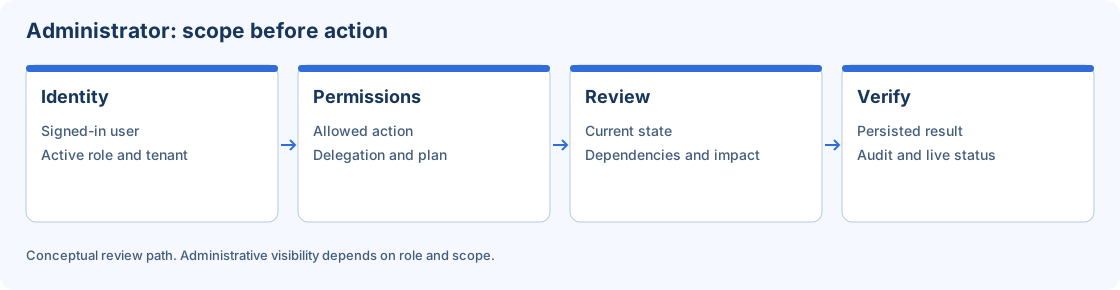
Conceptual authorization review. Visible controls do not replace server checks.
Dova action matrix
| Surface/action | Read | Edit/operate |
|---|---|---|
| Overview | etl.overview.view |
No Overview management permission in the catalog. |
| Domains/Folders | etl.domains.view |
etl.domains.manage |
| Mappings | etl.mappings.view |
etl.mappings.manage |
| Sessions | etl.sessions.view |
etl.sessions.manage |
| Workflows | etl.workflows.view |
etl.workflows.manage |
| Run Workflow | Appropriate design access | etl.workflows.run |
| Cancel/terminate a run | etl.monitor.view |
etl.workflows.terminate |
| Rerun/recover | etl.monitor.view |
etl.workflows.run |
| Monitor maintenance | etl.monitor.view |
etl.monitor.manage, separate from run-specific operations. |
| Connections/custody catalog | etl.connections.view |
etl.connections.manage |
| Workers/runtime/profiles | etl.runtime.view |
etl.runtime.manage |
| Workflow Scheduler | etl.scheduler.view |
etl.scheduler.manage |
| General policies/preferences | etl.configuration.view |
etl.configuration.manage |
| Notification channels/settings | etl.notifications.view |
etl.notifications.manage |
| Plans/subscriptions | billing.view |
Administrative operations require billing.manage and applicable scope. |
Configuration can be visible through Configuration, Runtime or Scheduler read access. Its tabs retain their own rules: seeing scheduler does not grant permission to change runtime defaults. Artifact selectors may use permitted read access without granting permission to create Domains or Folders.
Administrator matrix
| Surface | Read | Manage |
|---|---|---|
| Administrator entry | admin.access |
Does not replace section permissions. |
| Overview/resource history | admin.overview.view |
Resources have their own management permissions. |
| Users/presence | admin.users.view |
admin.users.manage |
| Tenants/tenant ETL cleanup | admin.tenants.view |
admin.tenants.manage |
| Roles/permission catalog | admin.roles.view |
admin.roles.manage |
| Audit | admin.audit.view |
No audit modification permission in the catalog. |
| Cloud workers/dependencies | admin.cloud_workers.view |
admin.cloud_workers.manage |
| Registrations | admin.registrations.view |
admin.registrations.manage |
| Billing/Commerce | billing.view |
billing.manage |
| Execution email/notifications | etl.notifications.view |
etl.notifications.manage |
Registrations permissions are platform-only. Global catalog and tenant-offer mutations also require the active platform role together with billing.manage. A tenant billing role cannot change global terms simply because it can see billing.
Interpret built-in role boundaries
ETL Viewer is read-oriented. ETL Developer includes ETL design and execution but excludes Monitor management and Workflow termination. ETL Operator includes read, execution/termination and Monitor management rather than design management. Tenant Administrator does not include billing management in its base set. Public Trial is an explicit limited set, not every ETL action; plan and expiry remain independent checks.
Custom roles and actual assignments may differ. Inspect Roles & permissions in your organization and treat the server session as authority, not browser compatibility labels. Historical route naming can differ from the current module label, so check the actual action contract instead of inferring permission from a URL word.
Run a least-privilege acceptance exercise
- Prepare a published two-row laboratory Mapping, Session and Workflow.
- Sign in as a permitted viewer and confirm read access while edit/run actions are denied.
- Use an authorized operator context and verify a run and Monitor inspection without acquiring design management.
- Use a developer context to edit/validate the design and check its separate termination restrictions.
- Record the action, tenant, active role and safe result; do not reuse an administrator session to test a viewer.
- Inspect relevant Audit events and restore temporary laboratory assignments.
For a rejection, investigate the correct context and permission before changing a role. Do not solve every 403 by assigning a platform wildcard. Continue with account menu, roles and Audit.