Workflows: orchestrate, publish, run and schedule
A Workflow coordinates tasks and the dependencies that determine their execution order. Session tasks bind transformations to a runtime context. Decision tasks choose complementary branches; timers and terminal tasks express the intended orchestration. Published versions should be reviewed together with the Session and Mapping versions they consume.
Prepare a published Session and compatible worker before testing. Separate permissions may be required for editing, publishing, running and schedule management. Use a laboratory Domain and Folder and a distinct output destination.
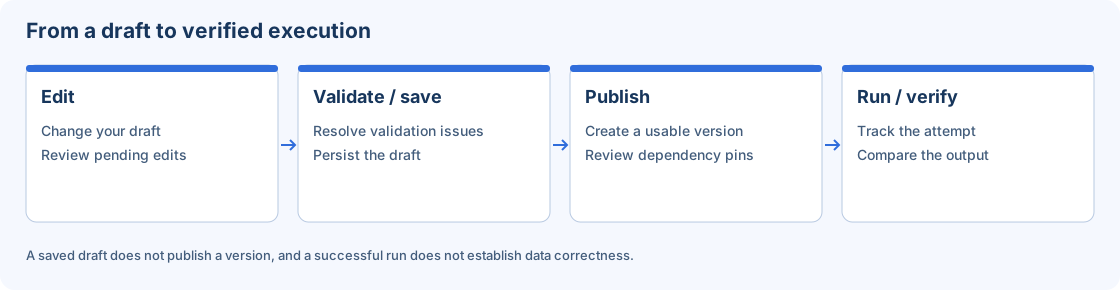
Conceptual lifecycle: edit, validate/save, publish, then run and verify.
Step-by-step procedure
Create the Workflow. Open Workflows and create
w_CustomerDemo. Review its name, Domain, Folder and sharing scope. Open the editor and save the initial draft before building a more complex orchestration.Add a Session task. Add a task that references your prepared Session. Inspect its settings and the version of the dependency. Avoid selecting another similarly named Session without checking the identifier and execution environment.
Connect the task graph. Connect Start, Session and End for the smallest exercise. For additional tasks, review each dependency and link behavior. Use only the task and condition types available in the editor rather than assuming a general scripting language.
Configure decisions when needed. Enter the True branch expression (JSON); the interface generates the False branch automatically as its direct negation. Verify the referenced task or parameter identifiers. Do not create two independent conditions that could leave both branches active or neither active.
Validate, save and publish. Inspect the graph with Arrange and Fit, then validate it. Save draft after resolving errors and publish an accepted version. Save and Publish do not start an execution.
Run manually first. Launch the laboratory Workflow with the authorized inputs. Treat overrides as values for that attempt; they are not persistent edits to the Session or Workflow. Record the attempt identifier and non-sensitive parameter values.
Inspect tasks and output. Open Monitor and review global and task-level state, selected branches and the first relevant error. Compare the output with the expected synthetic result before calling the exercise successful.
Add a reusable schedule. In Configuration → Workflow Scheduler, prepare a schedule and assign it from the Workflow. Review its calendar, timezone and enabled state. Check the next planned execution and a resulting run separately; an enabled schedule is intent, not completion evidence.
Verify the result
Acceptance requires a published Workflow with the intended dependency versions, a terminal attempt consistent with the task graph, and an output that matches its oracle. The profile timezone controls presentation; a schedule has its own explicit timezone. Before repeated loads, confirm whether the destination supports retries without duplicates.
Errors and recovery
For a task that has not started, inspect parents, worker state, capacity and policy. For a failed task, inspect its first safe error rather than only the global state. A client timeout does not prove cancellation. For a dependency-version notice, review and republish deliberately. Checkpoint recovery depends on persisted state and cannot guarantee reversal of external writes.
Continue
Repository · Mappings · Sessions · Monitor · Configuration.