Plans and subscriptions: understand offers and workspace continuity
Plans and subscriptions presents the effective commercial choices for the active tenant. Availability depends on tenant type, lifecycle, plan and authorized offers. A displayed price, a checkout order and an active subscription are different stages; one does not automatically prove the next.
Review the tenant identity before entering checkout. A public trial is designed to continue as the same operational tenant after an accepted conversion, preserving object identity. Do not recreate the tenant or move objects to simulate that continuation.
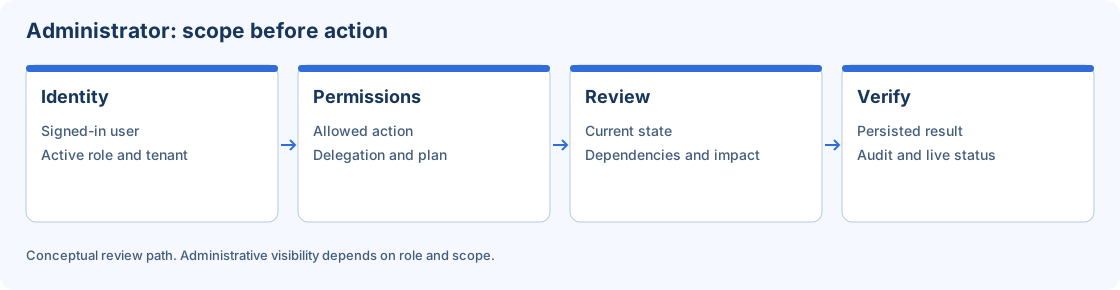
Commercial access depends on the active identity, tenant, permissions and plan.
Step-by-step procedure
Confirm the workspace. Open the account menu and record the active tenant. Open Plans and subscriptions and inspect the plan and lifecycle information available to your role. Do not use another tenant offer as the baseline for this workspace.
Review the effective offer. Read the offered plan version, price, currency, period, quantity and terms shown. Tenant-specific offers reference the global versioned catalog; they do not imply an independently duplicated product catalog.
Inspect checkout fields. If authorized to evaluate a purchase, review customer type, document type/number, legal name, email, country, address and payment method. Check totals and currency before advancing.
Use a controlled sandbox exercise. For learning, use supported fixtures or a separately authorized payment sandbox. Opening checkout is not permission to send a real payment confirmation. Synthetic tokens must never be submitted to a live provider.
Track the order outcome. After an actual authorized purchase, inspect the definitive order/subscription result through the supported flow. A delayed UI update is not evidence that no provider operation occurred. Resolve the existing order before repeating checkout.
Verify continuity. Confirm the active tenant identifier remains the intended one and existing Repository objects retain their identifiers. Inspect the accepted subscription and permitted capabilities independently of the payment UI message.
Review later changes. Before renewal or a new offer, inspect its validity and applicable contractual version. Historical orders retain their terms; a newly published price does not rewrite an earlier order.
Verify the result
A successful conversion is supported by an accepted commercial result, the operational tenant remaining the same and capabilities matching the applicable subscription. This manual provides a sandbox procedure; it does not certify a payment or provide a revenue forecast. Billing administrators investigate invoices, subscriptions and orders in their proper context.
Errors and recovery
If the offer is unavailable, check lifecycle, eligibility, plan and role. If amounts disagree, confirm currency, quantity and terms before submitting. For a pending order, investigate its current state rather than creating another. Do not mark an invoice paid or alter historical terms merely to make access appear correct.
Continue
Repository · Mappings · Sessions · Workflows · Monitor · Configuration.