Mapping sources and targets: formats, fields and runtime bindings
A source produces records, transformations alter them, and targets write results. The Mapping declares component format/schema; the Session supplies runtime file bindings and execution context. Database, API and Object storage components require a compatible worker. Selecting them does not install drivers, create permissions or establish network access.
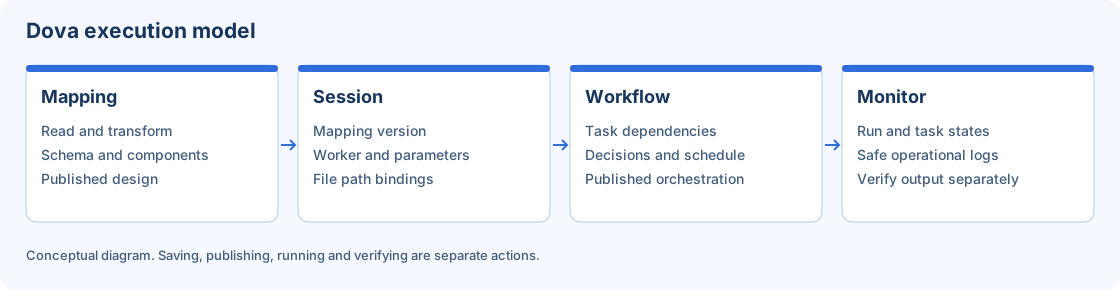
Conceptual separation of transformation design and runtime configuration.
Source catalog
| Component / identifier | Declared fields and options |
|---|---|
Flat File input / source_csv |
format (csv, tsv, txt); delimiter; hasHeader; headerRowNumber; columns; headerMappings; encoding (utf-8, utf-8-bom) |
JSON input / source_json |
format (json, jsonl); recordPath; fieldMappings; encoding (utf-8, utf-8-bom) |
Excel input / source_excel |
workbookFormat (auto, xlsx, xlsm, xls); sheetMode (single, list, pattern, regex, all); sheetName; sheetNames; sheetPattern; sheetNameRegex; includeHiddenSheets; hasHeader; headerRowNumber; dataStartRowNumber; startColumn; endColumn; columns; headerMappings; skipEmptyRows; includeSheetName; sheetNameField; passwordProtected |
Database input / source_database |
connectionId; sourceMode (table, query); schema; objectType (table, view); objectName; sqlQuery; selectedColumns; fetchSize; queryTimeoutSeconds |
API input / source_api |
connectionId; method (GET); resourcePath; responsePath; fieldMappings; paginationMode (none, page, offset, cursor); pageSize; retries; timeoutSeconds |
Object storage input / source_object |
connectionId; resource; format (csv, jsonl); selectedColumns; delimiter |
Configure file inputs step by step
- Prepare a tiny synthetic file with a known number of records and expected fields.
- For CSV/TSV/TXT, choose the real delimiter, header presence and one-based physical header row. Without a header, declare field names. Check logical field mapping and types.
- Choose UTF-8 or UTF-8 with BOM as required by the file contract.
- For JSON, choose array JSON or JSON Lines, identify the record path and map nested fields deliberately. Valid JSON can still have the wrong record structure.
- For Excel, select workbook format, sheet mode and the intended sheets. Set header/data row and column bounds explicitly. Review hidden sheets and empty-row policy.
- Include the sheet-name field when needed for provenance. Its initial name is
_sheet_name. - Supply a workbook password only through the supported runtime mechanism. Reading XLSM is not permission to run macros.
- Save the Mapping, then complete the actual source paths in the Session. Verify the worker can read them.
For multiple Excel sheets, confirm compatible layouts before selecting All. Notes and subtotal sheets can introduce records that do not belong to the intended dataset.
Configure remote inputs
Database input offers a table/view or a read query. Select an authorized Connection, schema/object or supported query, projected columns, fetch size and timeout. These operational fields do not replace business filters or guarantee every SQL dialect.
API input declares GET and a resource/record path, field mappings and supported pagination. Test with more records than one page to establish completeness. Object storage input uses an object key and supported CSV/JSON Lines format; its key is not a browser-local path.
Target catalog
| Component / identifier | Declared fields and options |
|---|---|
Flat File output / target_csv |
format (csv, txt); fileName; delimiter; includeHeader; textQualifier (double, single, none); quoteMode (minimal, all); escapeCharacter; lineEnding (lf, crlf); encoding (utf-8, utf-8-bom); nullValue |
JSON output / target_json |
format (json, jsonl); fileName; pretty; includeNulls; lineEnding (lf, crlf); encoding (utf-8, utf-8-bom) |
Database output / target_database |
connectionId; schema; objectName; writeMode (append, replace, upsert); batchSize; commitIntervalRows; keyColumns; createIfMissing; queryTimeoutSeconds |
API output / target_api |
connectionId; method (POST, PUT, PATCH); resourcePath; writeMode (append, upsert); keyColumns; uniqueKeysEnforced; batchSize; successCodes; retries; timeoutSeconds |
Object storage output / target_object |
connectionId; resource; format (csv, jsonl); writeMode (replace); delimiter; idempotencyKey; ifAbsent; expectedEtag; expectedGeneration |
Select write behavior deliberately
For Flat File output, choose header, delimiter, quote mode, escape, line endings, encoding and null representation before comparing bytes. For JSON, distinguish an array from JSON Lines and decide whether null fields are included. These are exchange contracts, not cosmetic settings.
Database append, replace and upsert have different effects; inspect keys, creation policy, batch size and commit interval. A failed load may have committed a previous batch. API write methods, accepted status codes, uniqueness and retries must match the endpoint contract. A retry is safe only when the actual operation is idempotent.
Object storage replacement supports declared preconditions such as absence, expected ETag/generation and idempotency. Preserve a failed precondition as a conflict to investigate; do not remove it merely to force the next write to succeed.
Acceptance and recovery
Create a two-row id,name CSV and a Flat File input → Flat File output Mapping. Publish, bind laboratory paths in the Session, run through a Workflow and verify two records and two fields. Quoting or line endings may differ if you selected another representation; compare against the declared contract.
For missing fields, inspect parsing and projection. For incomplete API data, inspect pagination. For wrong Excel rows, inspect sheet/range/header selection. For a partial destination write, inspect committed effects before retrying. Consult Sessions and transforms.