Monitor: follow attempts, diagnose failures and retain evidence
Monitor is the execution evidence surface. It helps you distinguish a definition from an attempt and a Workflow status from its task-level outcomes. Use filters and operational logs to trace an attempt without exposing input rows, credentials or unrestricted payloads.
Before troubleshooting, keep the run identifier, tenant, Workflow version and approximate time. Names may be reused and a new attempt can have a different outcome. Read access and actions such as cancellation, recovery or history cleanup are separately authorized.
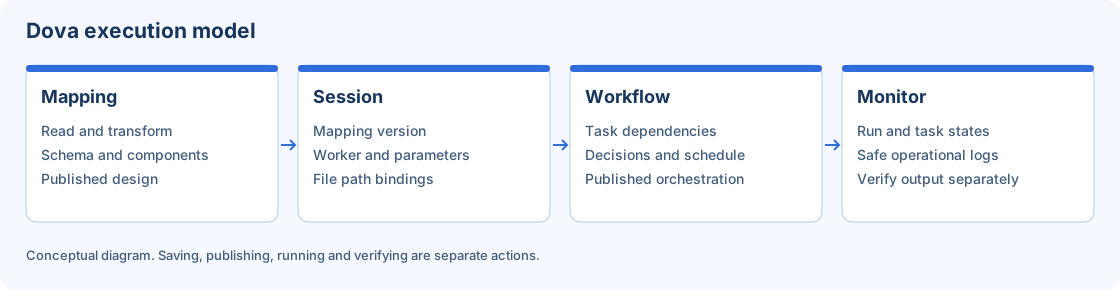
Monitor tracks the attempt; output validation remains a separate acceptance step.
Step-by-step procedure
Locate the attempt. Open Monitor and narrow the grid by the relevant name, state or time controls. Clear an accidental search term if a known run is missing. Match the identifier and creation time rather than relying only on the Workflow name.
Read the global state. Identify whether the attempt is still active or terminal. Queued or waiting is different from failed; cancelled is different from succeeded. Refresh the record before taking an action that depends on its current state.
Inspect individual tasks. Open the run detail or operational log view available for the attempt. Review task states and dependencies in order. Find the first relevant failure and distinguish a skipped downstream task from the cause of the problem.
Check runtime context. Review worker, parameter and file-binding context through the associated definitions. If the job is waiting for capacity, inspect Workers and Configuration. Do not start duplicate attempts just because the grid has not yet changed.
Choose a justified action. For cancellation, termination, repeat or checkpoint recovery, read the action and confirmation carefully. Check the current state and destination effects. A retry can create another output or repeat writes when the destination is not idempotent.
Verify the actual result. After a terminal success, locate the authorized output and compare row count, schema and expected values. Task success records execution behavior; it does not establish the business correctness of the transformation.
Review cleanup separately. History cleanup applies to completed history and has its own confirmation and retention scope. Inspect selected attempts and exclusions first. Do not remove evidence required for diagnosing an unresolved failure.
Verify the result
Create one successful laboratory run and one controlled failure using a missing synthetic source path. Locate both attempts, identify the failing task, restore the path, and observe a separate new attempt. Acceptance is a safe explanation of the cause and a verified result, with the earlier evidence retained according to policy.
Errors and recovery
An empty filtered grid is not the same as a failed request. If status changes while a dialog is open, reload before confirming. Keep exported reports in an authorized location. For provider or authentication errors, copy only the safe message and timestamp; never attach cookies, keys or decrypted values to an incident.
Continue
Repository · Mappings · Sessions · Workflows · Configuration.